Choose how your game looks
Every poker night is different. Now your game screen can be too. Choose from three layouts, then fine-tune the display to suit your room, your screen and your players.
What's new
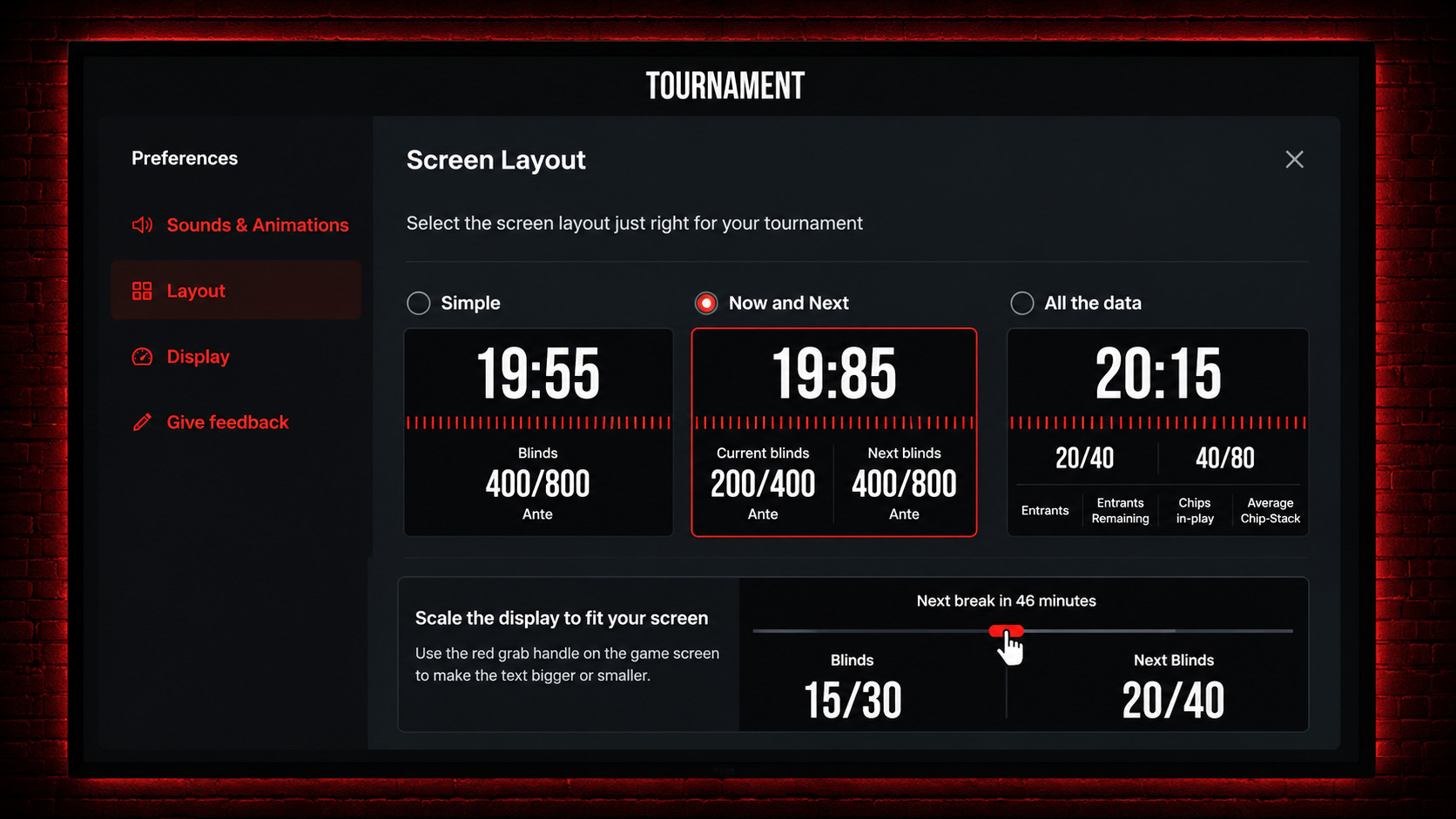
You can now choose between three different game screen layouts:
Simple keeps the focus on the clock and current blinds.
Now & Next adds the upcoming blinds, so everyone can see what's coming.
All Data gives players the full picture, including entrants, players remaining, chips in play and average stack.
You can also use the grab handle directly on the game screen to scale the size of the text, giving you control over how much information is shown and how easy it is to read.
How to use it
Choose your preferred layout in your display settings and switch whenever you like.
Then use the grab handle to scale the display to suit your setup. Whether you're running a game on a laptop, a big TV or a projector across the room, you can get the balance just right.
Why it matters
There's no single right way to run a poker game, and no two setups are the same.
Some hosts want a huge clock that can be read from across the room. Others want more tournament information on screen at once.
Choose the layout. Scale it to fit. Make the game screen work for your room.